-
×
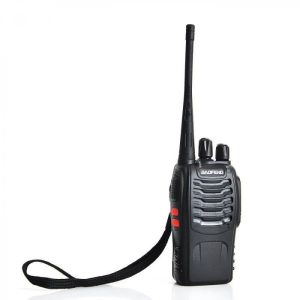 Baofeng walkie talkie F-888S
1 × KSh 2,300.00
Baofeng walkie talkie F-888S
1 × KSh 2,300.00
Subtotal: KSh 2,300.00

The NETIS E3 AC1200 is a versatile dual-band wireless device designed to eliminate WiFi dead zones and provide flexible networking solutions for homes, offices, and travel -1. With combined speeds of up to 1167Mbps, three operating modes, and a compact wall-plug design, this multi-functional device can serve as a router, access point, or range extender—adapting to your specific networking needs with ease -6. Perfect for expanding coverage, creating mobile offices, or setting up secure home networks, the E3 delivers reliable performance in a portable package -2.
KSh 2,200.00
*AC1200 Speed | 2.4GHz & 5GHz | 3-in-1 Multi-Mode | Wall-Plug Design*
The NETIS E3 AC1200 is a versatile dual-band wireless device designed to eliminate WiFi dead zones and provide flexible networking solutions for homes, offices, and travel -1. With combined speeds of up to 1167Mbps, three operating modes, and a compact wall-plug design, this multi-functional device can serve as a router, access point, or range extender—adapting to your specific networking needs with ease -6. Perfect for expanding coverage, creating mobile offices, or setting up secure home networks, the E3 delivers reliable performance in a portable package -2.
📶 AC1200 Dual-Band Speed — Delivers combined wireless speeds of up to 1167Mbps (300Mbps on 2.4GHz + 867Mbps on 5GHz), ensuring smooth 4K streaming, online gaming, and bandwidth-intensive tasks -3-4.
🔄 3-in-1 Multi-Mode Operation — Supports Router, Access Point (AP), and Range Extender/Repeater modes, allowing you to adapt the device for different scenarios—create a new network, extend existing coverage, or convert wired internet to WiFi -1-6.
📍 Smart Signal Indicator — Built-in LED indicator helps you find the optimal placement location: blue light indicates good signal, red light means poor signal—take the guesswork out of positioning for maximum coverage -2-4.
🔌 Compact Wall-Plug Design — Space-saving form factor with built-in power adapter plugs directly into wall outlets, eliminating clutter and making it ideal for travel or permanent installation -1-6.
⚡ Quick WPS Setup — One-touch WPS button pairs with your main router within seconds for instant extender configuration—no technical expertise required -2-4.
📡 2× External High-Gain Antennas — Dual omnidirectional antennas enhance signal strength and coverage, penetrating walls and floors for better reach throughout your home or office -1-3.
🔌 Ethernet Port for Wired Connections — 1× 10/100Mbps RJ45 port allows connection of wired devices like smart TVs, gaming consoles, or desktop PCs—also enables AP mode for converting wired internet to WiFi -3-4.
🎯 Eliminates WiFi Dead Zones — Extends wireless coverage to hard-to-reach areas, covering up to 3000 sq. ft. and supporting up to 32 connected devices simultaneously -4-7.
🛡️ Comprehensive Security — Supports WEP, WPA-PSK/WPA2-PSK encryption, with advanced Internet Access Control including IP filtering, MAC filtering, and domain filtering based on time schedules -1-2.
📊 Intelligent Bandwidth Control — Manage bandwidth usage for each connected device reasonably, ensuring fair distribution and preventing any single device from monopolizing your network -1-6.
🌍 Broad Compatibility — Works with virtually all 2.4GHz and 5GHz 802.11ac/b/g/n routers, gateways, and access points from any ISP including Safaricom, Zuku, and other providers -4-9.
📱 Easy Web-Based Management — Multi-language management page for quick setup and configuration via any web browser—no CD or software installation required -1-6.
🔋 Energy Efficient — Low power consumption with intelligent power management, environmentally friendly operation -1.
✅ 2-Year Warranty — Backed by 2-year manufacturer warranty and free technical support for peace of mind -2-4.
| Specification | Details |
|---|---|
| Model Number | E3 |
| Wireless Standards | IEEE 802.11b/g/n 2.4GHz, IEEE 802.11a/n/ac 5GHz |
| Wireless Speed | AC1200: 300Mbps (2.4GHz) + 867Mbps (5GHz) |
| Frequency Bands | 2.4-2.4835GHz, 5.150-5.85GHz |
| Antenna Type | 2× Omnidirectional dual-band antennas (3dBi each) |
| Ethernet Port | 1× 10/100Mbps Auto MDI/MDIX RJ45 LAN/WAN port |
| Operating Modes | Router, Access Point (AP), Range Extender/Repeater |
| Wireless Security | 64/128-bit WEP, WPA-PSK/WPA2-PSK (TKIP/AES) |
| Buttons | WPS button, Reset button |
| LED Indicators | Power, Signal Good, Signal Poor, WPS |
| Power Supply | DC 3.35V/3A (built-in wall plug design) |
| Coverage Area | Up to 3000 sq. ft. (depending on environment) |
| Device Capacity | Supports up to 32 connected devices |
| Dimensions (L×W×H) | 74 × 50 × 1.6 mm (2.91 × 1.97 × 0.06 inches) |
| Weight | 258g (0.57 lbs) |
| Certifications | FCC, CE, EAC, RoHS |
| Operating Temperature | 0°C to 40°C (32°F to 104°F) |
| Storage Temperature | -40°C to 70°C (-40°F to 158°F) |
| Operating Humidity | 10% to 90% non-condensing |
| Storage Humidity | 5% to 90% non-condensing |
| Warranty | 2 years manufacturer warranty |
| Band | Speed | Best For |
|---|---|---|
| 2.4GHz | Up to 300 Mbps | Longer range, better wall penetration, compatibility with older devices |
| 5GHz | Up to 867 Mbps | Higher speed, less interference, ideal for HD streaming and gaming |
| Total | AC1200 | Combined dual-band performance for all your networking needs |
| Mode | Function | Best Use Case |
|---|---|---|
| Router Mode | Creates a new internal network from a DSL or cable modem, with NAT, DHCP server, and firewall protection -1-6. | Setting up a new WiFi network where none exists—perfect for dorms, apartments, or temporary setups. |
| Access Point (AP) Mode | Converts a wired Ethernet connection into a wireless access point, expanding WiFi coverage to areas with Ethernet drops -3-6. | Adding WiFi to a room with an Ethernet wall jack, or creating a guest network in a conference room. |
| Range Extender/Repeater Mode | Picks up wireless signal from your main router and rebroadcasts it to extend coverage to areas the main router cannot reach -2-6. | Eliminating dead zones in large homes, multi-story buildings, or spaces with thick walls. |
| Connection | Type | Purpose |
|---|---|---|
| Ethernet Port | 10/100Mbps RJ45 | Connect to modem (Router mode), connect to router (AP mode), or connect wired devices |
| WPS Button | One-touch pairing | Quick connection to existing router for extender setup |
| Reset Button | Pinhole recessed | Restore factory default settings |
| LED Status | Indication |
|---|---|
| Blue Light (Solid) | Good signal strength—optimal placement |
| Red Light (Solid) | Poor signal strength—relocate closer to router |
| Flashing | WPS pairing in progress or activity |
| Off | No power or device in standby |
🏠 Large Homes & Multi-Story Houses — Eliminate WiFi dead zones in basements, upstairs bedrooms, or remote corners of your home -2-7.
🏢 Small Offices & Shops — Provide reliable WiFi coverage throughout office spaces, retail shops, cafes, and restaurants -3-7.
🚐 Travel & Mobile Use — Compact wall-plug design with built-in power adapter makes it perfect for hotels, Airbnbs, or creating a secure personal hotspot on the go -1-6.
🎓 Dorms & Apartments — Set up your own secure network or extend existing WiFi to your room for better performance.
🏥 Medical & Professional Offices — Reliable, secure WiFi for patient rooms, waiting areas, and administrative spaces.
🎮 Gamers & Streamers — 5GHz band provides low-latency, high-speed connections for online gaming and 4K streaming.
📹 Smart Home Users — Extend coverage to smart cameras, doorbells, thermostats, and IoT devices throughout your property -4.
📚 Students & Remote Workers — Ensure stable video conferencing and online learning from any room in the house.
| Item | Quantity |
|---|---|
| NETIS E3 AC1200 Device | 1 unit (with built-in power adapter) |
| Quick Installation Guide | 1 (multi-language) |
| Warranty Information | 1 |
Note: Ethernet cable may or may not be included depending on region and retailer. Check with your specific seller for included accessories .
⭐ 4.4/5 Stars on Amazon — Highly rated by users for ease of setup, reliability, and performance -4.
⭐ 4.9/5 Stars on Walmart — Excellent customer satisfaction ratings for the E3 extender model -5.
📈 Top Choice in Bangladesh, Kenya, and South Africa — Popular budget-friendly networking solution across multiple markets -3-6-7.
WEP Encryption Limitation: For networking safety reasons, this extender cannot extend WiFi signals from main routers using WEP encryption. If your main router uses WEP, please change to WPA-PSK/WPA2-PSK encryption -4.
Logo Variations: You may receive a unit with either the older or newer Netis logo. Both versions are identical in features, specifications, and firmware -4.
Ethernet Speed: The Ethernet port is 10/100Mbps Fast Ethernet, not Gigabit. This is sufficient for most internet connections but may limit wired speeds if you have fiber gigabit service .
Coverage Estimates: Actual coverage (up to 3000 sq. ft.) depends on home construction, interference, and placement. Use the Smart Signal Indicator for optimal positioning .
📍 Optimal Placement for Extender Mode: Place the E3 approximately halfway between your router and the dead zone, within good range of the router signal. Use the Smart Signal Indicator—aim for a solid blue light . If it glows red, move it closer to the router -2-4.
🔧 Quick Setup via WPS: For the fastest configuration in Extender mode, press the WPS button on your main router, then within 2 minutes press the WPS button on the E3. Connection establishes automatically within seconds -2.
🔌 Use AP Mode for Wired Backhaul: If you have an Ethernet wall jack in a weak coverage area, use Access Point mode for the most stable, fastest connection—better than wireless repeating .
🔄 Dual-Band Strategy: Connect bandwidth-intensive devices (streaming sticks, gaming consoles) to the 5GHz band, and place smart home devices or devices far from the router on the 2.4GHz band for best results .
🔋 Firmware Updates: Check for firmware updates periodically through the web management interface to ensure optimal performance and security .
🌟 Why Choose NETIS E3? The E3 stands out for its versatility—it’s not just an extender but a full 3-in-1 networking solution. Whether you need a travel router, a permanent access point, or a dead-zone eliminator, this single device adapts to your needs. The smart signal indicator takes the guesswork out of placement, while the wall-plug design keeps your space clutter-free. At an affordable price point with solid performance and 2-year warranty, it’s one of the most flexible networking tools available .