-
×
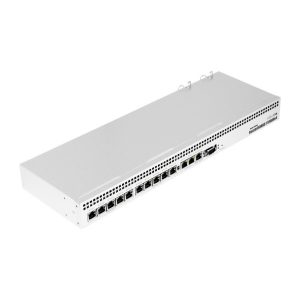 Mikrotik RB1100AH*4 Dude Edition
1 × KSh 45,000.00
Mikrotik RB1100AH*4 Dude Edition
1 × KSh 45,000.00 -
×
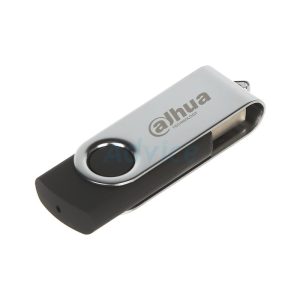 Dahua U116 USB 2.0 Flash Disk 64GB
1 × KSh 400.00
Dahua U116 USB 2.0 Flash Disk 64GB
1 × KSh 400.00
Subtotal: KSh 45,400.00
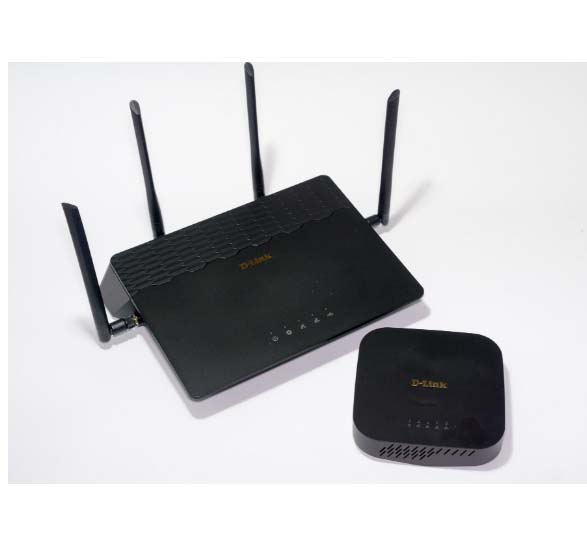
D-Link COVR-3902 is a high-performance AC3900 Wi-Fi system engineered to eliminate dead zones and deliver blazing-fast internet throughout large homes and complex spaces -1-9. This innovative system combines an AC2600 High-Power Wi-Fi Router (COVR-2600R) and an AC1300 Seamless Wi-Fi Extender (COVR-1300E) to create a unified, intelligent mesh network –
KSh 13,500.00
*AC3900 Speed | 6,000+ sq. ft. Coverage | 4×4 MU-MIMO | Seamless Roaming*
The D-Link COVR-3902 is a high-performance AC3900 Wi-Fi system engineered to eliminate dead zones and deliver blazing-fast internet throughout large homes and complex spaces -1-9. This innovative system combines an AC2600 High-Power Wi-Fi Router (COVR-2600R) and an AC1300 Seamless Wi-Fi Extender (COVR-1300E) to create a unified, intelligent mesh network -1-9. With combined speeds of up to 3900 Mbps, 4×4 MU-MIMO technology, and coverage of up to 6,000 square feet, the COVR-3902 provides seamless, uninterrupted connectivity for 4K streaming, online gaming, and bandwidth-hungry smart homes -2-6-9.
📶 AC3900 Combined Speed — Delivers total wireless speeds of up to AC2600 from the router (800 Mbps on 2.4GHz + 1733 Mbps on 5GHz) and AC1300 from the extender (400 Mbps on 2.4GHz + 867 Mbps on 5GHz) for lightning-fast performance throughout your home -1-2-9.
🏠 Massive Whole-Home Coverage — Covers up to 6,000 sq. ft. (approximately 550-560 sqm) by combining the router’s High-Power ‘PowrZone’ with strategic extender placement, eliminating dead zones in even the largest homes -2-6-9.
🔄 Seamless Smart Roaming — Creates a single, unified network name (SSID) that automatically connects your devices to the strongest signal as you move through your home, with no dropped connections or manual switching required -1-6-9.
⚡ 4×4 MU-MIMO Technology — Multi-User Multiple Input Multiple Output allows simultaneous data transmission to multiple devices, eliminating lag and buffering even when dozens of devices are connected -1-2-6.
🧭 Smart Steering & Band Steering — Automatically directs devices to the optimal frequency band (2.4GHz or 5GHz) based on network traffic and device capability, ensuring peak performance at all times -1-2.
🔌 4 Gigabit Ethernet Ports on Router — The COVR-2600R features 1× Gigabit WAN port and 4× Gigabit LAN ports for high-speed wired connections to gaming consoles, smart TVs, and other devices -1-2.
📦 Expandable Mesh Network — Supports adding additional Covr extenders to scale coverage further as your needs grow, with support for up to multiple extenders -2.
🔋 High-Speed USB 3.0 Port — The router includes a USB 3.0 port for connecting external storage drives and sharing media across your network or creating a personal cloud -1-2-5.
📱 Easy App-Based Setup — Simple step-by-step configuration using the D-Link Wi-Fi app for iOS and Android, or via web browser wizard for advanced users -2-4-6.
👨👩👧 Advanced Parental Controls — Create schedules for internet access, filter inappropriate content, and monitor children’s online activity through the intuitive app interface -1-2-9.
📡 Beamforming Technology — Focuses Wi-Fi signals directly to connected devices rather than broadcasting omnidirectionally, improving range and reliability -6.
🎨 Elegant Design — Sleek, matte black finish with compact form factors that blend seamlessly with home entertainment centers and décor -1.
| Specification | COVR-2600R (Router) | COVR-1300E (Extender) |
|---|---|---|
| Wireless Standard | 802.11ac Wave 2, backward compatible with 802.11b/g/n/a | 802.11ac Wave 2, backward compatible with 802.11b/g/n/a |
| Total Speed | AC2600 | AC1300 |
| 2.4GHz Speed | Up to 800 Mbps | Up to 400 Mbps |
| 5GHz Speed | Up to 1733 Mbps | Up to 867 Mbps |
| Ethernet Ports | 1× Gigabit WAN + 4× Gigabit LAN | 2× Gigabit LAN |
| Antennas | 4× External high-efficiency antennas | 2× Internal antennas |
| USB Port | 1× USB 3.0 | None |
| MU-MIMO | 4×4 (simultaneous 4 streams) | 2×2 |
| Processor | Qualcomm Quad-Core | Qualcomm |
| Dimensions (W×D×H) | 285-290 × 205-210 × 48-55 mm (11.2 × 8.1 × 1.9 inches) | 134 × 134 × 33 mm (5.28 × 5.28 × 1.3 inches) |
| Weight | ~845g (1.86 lbs) | Not specified |
| LED Indicators | Power, WPS, Wi-Fi, internet, LAN ports | Power, WPS, Wi-Fi, connection quality |
| Buttons | Power, WPS, Wi-Fi On/Off | Power, WPS, Wi-Fi On/Off |
| Operating Temperature | 0°C to 40°C (32°F to 104°F) | 0°C to 40°C (32°F to 104°F) |
| Storage Temperature | -40°C to 70°C (-40°F to 158°F) | -40°C to 70°C (-40°F to 158°F) |
| Coverage Area | Up to 6,000 sq. ft. combined system coverage | Part of combined system coverage |
| Management | D-Link Wi-Fi App (iOS/Android) + Web Interface | Managed through router interface |
| Warranty | Limited manufacturer warranty | Limited manufacturer warranty |
| Feature | Benefit |
|---|---|
| High-Power AC2600 Core Router | The COVR-2600R serves as the powerful backbone of your network, handling bandwidth-intensive activities like 4K streaming and online gaming with ease -6-9. |
| Dedicated Wi-Fi Extender | The COVR-1300E extends coverage to remote corners, upstairs rooms, and outdoor areas without compromising speed -6. |
| 4×4 MU-MIMO Technology | Unlike standard routers that serve devices one at a time, MU-MIMO communicates with up to 4 devices simultaneously, perfect for busy households -1-2-6. |
| Smart Steering | Automatically balances devices between 2.4GHz and 5GHz bands based on traffic load and signal strength, ensuring optimal performance for every device -1-2. |
| Beamforming | Focuses Wi-Fi energy toward connected devices rather than broadcasting in all directions, extending range and improving reliability -6. |
| Seamless Roaming | Move from room to room while on video calls or streaming — your device hands off to the strongest node without dropping the connection -1-6-9. |
| Component | Description |
|---|---|
| COVR-2600R Router | Sleek, low-profile black matte finish measuring approximately 287×251×53mm; lies flat horizontally with external antennas for optimal signal propagation -1. |
| COVR-1300E Extender | Compact square design measuring 134×134×33mm; plugs directly into wall outlets with discreet appearance that doesn’t obstruct other outlets -1-2. |
| Build Quality | Solid construction with matte finish resists fingerprints and scratches; ventilation designed for silent, fanless operation -1. |
| LED Indicators | Soft, non-intrusive LEDs on both devices indicate power, connection status, and Wi-Fi activity; extender features color-coded LED (green/orange/red) for optimal placement guidance -4. |
| Port Placement | Router ports located on rear for cable management; extender ports on side for easy access when wall-mounted -1. |
| Device | Port Type | Quantity | Purpose |
|---|---|---|---|
| COVR-2600R Router | Gigabit WAN | 1 | Connect to cable/DSL modem or fiber ONT |
| COVR-2600R Router | Gigabit LAN | 4 | Wired connections for gaming consoles, smart TVs, desktop PCs |
| COVR-2600R Router | USB 3.0 | 1 | Connect external storage for media sharing or personal cloud |
| COVR-1300E Extender | Gigabit LAN | 2 | Wired connections for devices in remote locations |
| Both Devices | Power | 1 | DC power adapter input |
| Both Devices | WPS Button | 1 | One-touch secure device pairing |
| Both Devices | Wi-Fi On/Off | 1 | Toggle wireless radio |
| Both Devices | Power Button | 1 | Device on/off control |
📲 Mobile App Setup — Download the D-Link Wi-Fi App from iOS App Store or Google Play, scan the QR code from the quick install card, and follow simple on-screen instructions. The entire process takes minutes -2-6.
🖥️ Web Browser Setup — Access http://covr.local or 192.168.0.1 from any connected device to launch the Smart Wizard for step-by-step configuration -4.
📍 Extender Placement Guidance — After initial setup, place the COVR-1300E halfway between the router and your dead zone. The LED indicator will glow green for optimal connection, orange for fair connection, or red for poor connection — adjust placement accordingly -4.
🎮 Advanced Configuration via Web — Access QoS (Quality of Service) to prioritize gaming or streaming traffic, configure port forwarding for gaming consoles, set up VPN, and manage advanced network settings -4.
👨👩👧 Parental Controls — Schedule internet access for children’s devices, block inappropriate content by category, and view browsing history through the app -1-2-9.
🌐 Guest Network — Create separate Wi-Fi for visitors with optional time limits, keeping your main network secure -1.
🔄 Firmware Updates — Receive automatic notifications when new firmware is available; update directly through the app or web interface to ensure optimal performance and security -2.
🔐 Encryption Standards — Full WPA/WPA2 wireless encryption with 128-bit AES data encryption to keep your network secure -2.
🛡️ SPI Firewall — Stateful Packet Inspection firewall protects against common internet threats and intrusions.
👤 Guest Network Isolation — Guests can access the internet but cannot see or access devices on your main network -1.
📋 Access Control — Whitelist or blacklist specific devices by MAC address for granular control over network access.
🔒 WPS Support — Secure one-touch push-button setup for adding compatible devices without exposing passwords -2-4.
| Item | Quantity | Description |
|---|---|---|
| COVR-2600R Router | 1 | Main AC2600 router unit |
| COVR-1300E Extender | 1 | AC1300 extender unit |
| Power Adapters | 2 | DC power adapters for both units |
| Ethernet Cable | 1 | CAT5e cable for connecting router to modem |
| Quick Install Guide | 1 | Setup instructions and QR code for app |
| Warranty Card | 1 | Warranty information and registration details |
🏰 Large Homes & Multi-Story Houses — Eliminate dead zones across 6,000+ sq. ft. with seamless whole-home coverage that penetrates floors and walls -2-6-9.
🏢 Complex Layouts & Challenging Floor Plans — Perfect for homes with thick walls, multiple levels, L-shaped designs, or remote additions where traditional routers fail -1-6.
🎬 4K Streaming Enthusiasts — Bandwidth-heavy 4K Netflix, Disney+, and YouTube streaming on multiple TVs simultaneously without buffering -6-9.
🎮 Serious Online Gamers — Low-latency gaming with QoS prioritization for consoles and PCs, plus wired Ethernet options for lag-free performance -6.
💼 Work-From-Home Professionals — Reliable, uninterrupted video conferencing and VPN connections whether in home office or moving throughout the house -6.
🏠 Smart Home Power Users — Support for dozens of IoT devices, smart speakers, security cameras, smart plugs, and sensors simultaneously -6.
👨👩👧👦 Large Family Households — Multiple users streaming, gaming, working, and learning without competition or slowdowns -1-9.
📸 Content Creators & Media Professionals — Fast file transfers, reliable streaming, and USB 3.0 port for media sharing and backup.
🏛️ Homes with Outdoor Spaces — Extend coverage to patios, pools, and gardens with strategic extender placement.
Industry Recognition — Experts note the COVR-3902’s combination of high technical specifications with optimal value, continuing D-Link’s tradition of quality networking solutions -1.
Performance Testing — The AC2600 High-Power router core delivers exceptional speed and range, creating a powerful ‘PowrZone’ for primary living areas -2-9.
💡 Pro Tip: For optimal coverage, place the COVR-2600R router centrally in your home near your modem. Position the COVR-1300E extender approximately halfway between the router and your farthest dead zone, ideally with minimal obstruction. Use the extender’s color-coded LED — if it glows orange or red, move it closer to the router until you achieve a solid green light -4.
🔧 Placement Strategy: The COVR-1300E extender is designed to be placed at the edge of the router’s coverage zone to extend signal outward. Avoid placing it too close to the router (wastes coverage potential) or too far (weak connection). The LED indicator takes the guesswork out of placement -4.
🎯 Performance Tip: For bandwidth-intensive devices like gaming consoles, 4K streaming boxes, or desktop PCs, use the Gigabit Ethernet ports on either the router or extender for the fastest, most stable connection. The COVR-2600R’s 4 LAN ports provide plenty of wired options -1-2.
⚠️ Note: The COVR-3902 system uses one SSID (network name) for seamless roaming, but you can optionally configure separate bands through advanced settings if you prefer manual control -4.
📱 App Advantage: The D-Link Wi-Fi app not only simplifies setup but also provides ongoing value with firmware update notifications, real-time network monitoring, and easy parental control management — all from your smartphone -2.
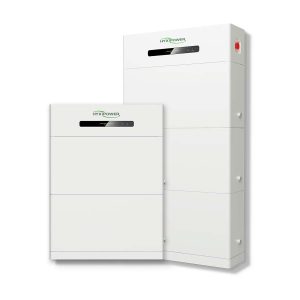
HYXiPOWER HYX-E50-H3 is a high-voltage lithium-ion battery storage system designed for residential and commercial energy management. Featuring safe LiFePO₄ chemistry, 5.12kWh nominal energy, and IP65 weatherproof construction, this wall-mountable battery integrates seamlessly with solar inverter systems to maximize self-consumption, provide backup power, and optimize energy costs.
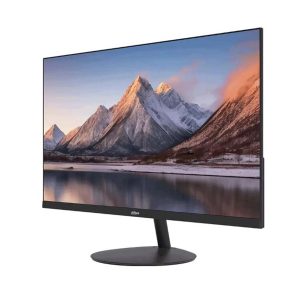
Dahua DHI-LM24-A200Y is a 23.8-inch Full HD monitor engineered for crystal-clear visuals and smooth performance in professional and home environments -1. Featuring a high-quality VA panel with 100Hz refresh rate, ultra-narrow bezel design, and eye-care technology, this compact monitor delivers an immersive viewing experience for work, study, and everyday entertainment -5.