-
×
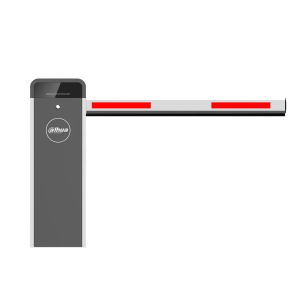 Dahua IPMECD-2032 Variable Frequency Straight Arm Boom Barrier
1 × KSh 350,000.00
Dahua IPMECD-2032 Variable Frequency Straight Arm Boom Barrier
1 × KSh 350,000.00 -
×
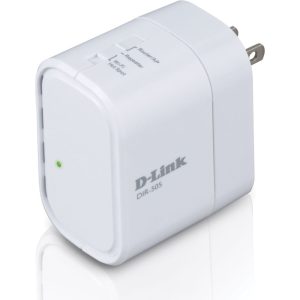 Dlink DIR-505
1 × KSh 2,500.00
Dlink DIR-505
1 × KSh 2,500.00
Subtotal: KSh 352,500.00
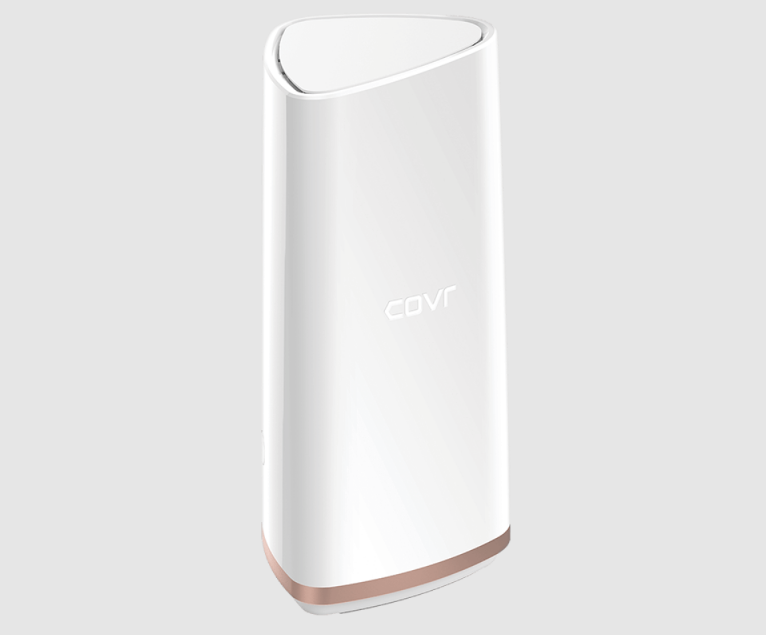
The D-Link COVR-2202 is a powerful tri-band mesh Wi-Fi system designed to eliminate dead zones and deliver seamless internet connectivity throughout your entire home -5. Featuring AC2200 tri-band technology, MU-MIMO support,
KSh 9,500.00
*AC2200 Speed | 5,500+ sq. ft. Coverage | Tri-Band Technology | Wi-Fi Mesh System*
The D-Link COVR-2202 is a powerful tri-band mesh Wi-Fi system designed to eliminate dead zones and deliver seamless internet connectivity throughout your entire home -5. Featuring AC2200 tri-band technology, MU-MIMO support, and a dedicated 5GHz backhaul band, this two-pack system provides up to 6,000 sq. ft. of coverage -10. With its elegant design, easy setup via mobile app, and advanced security features including a complimentary McAfee subscription, the COVR-2202 is the perfect solution for modern connected homes, bandwidth-heavy streaming, and uninterrupted work-from-home productivity -5.
📶 AC2200 Tri-Band Wi-Fi — Delivers combined speeds of 400 Mbps on 2.4GHz and 866 Mbps on each of two 5GHz bands, ensuring smooth 4K streaming, gaming, and downloads -1-4-10.
🔄 Dedicated 5GHz Backhaul Band — One 5GHz band is exclusively reserved for communication between mesh nodes, freeing up the other bands for your devices and preventing speed degradation common in dual-band systems -10.
🏠 Extensive Whole-Home Coverage — Two-pack system covers up to 6,000 sq. ft. (approximately 550-560 sqm) , with the ability to add additional Covr Points to expand coverage further -1-5-10.
⚡ MU-MIMO Technology — Multi-User Multiple Input Multiple Output allows multiple devices to stream data simultaneously, eliminating lag and buffering even with dozens of connected devices -4-10.
🧭 Smart Roaming & Steering — Automatically connects your devices to the strongest signal as you move through your home, while Smart Steering directs devices to the least congested band for optimal performance -10.
🔒 Built-in McAfee Security — Comes with a complimentary 5-year McAfee Internet security subscription and 2-years McAfee Antivirus protection for unlimited devices, providing comprehensive family protection -5.
📱 Easy App-Based Setup — Simple step-by-step configuration using the D-Link Wi-Fi app for iOS and Android; factory-paired nodes ensure hassle-free installation -2-5-8.
🎨 Elegant Design — Stylish white towers with subtle bronze trim and soft LED indicators blend seamlessly with home décor; ports discreetly hidden at the base -2-4-5.
🔌 Dual Gigabit Ports — Each node features 2× auto-sensing Gigabit Ethernet ports (WAN/LAN) for wired connections to gaming consoles, TVs, or other devices -1-4-10.
📡 DFS Channel Support — Access to DFS (Dynamic Frequency Selection) channels unlocks additional 5GHz frequencies with minimal congestion for cleaner, faster Wi-Fi -10.
🧠 Qualcomm Quad-Core Processor — Powered by the Qualcomm IPQ4019 quad-core chipset with 16MB RAM and 256MB storage, ensuring responsive performance and smooth data handling -2-4-7.
🔄 Scalable Mesh Expansion — Support for up to 4 nodes (with potential for more in future firmware), allowing you to grow your network as needed -2-8.
| Specification | Details |
|---|---|
| Model Number | COVR-2202 (2-Pack Kit) |
| Wireless Standard | 802.11ac Wave 2, backward compatible with 802.11b/g/n/a -1-10 |
| Total Wi-Fi Speed | AC2200 (400 Mbps + 866 Mbps + 866 Mbps) -4-10 |
| Frequency Bands | Tri-Band: 2.4GHz (400 Mbps), 5GHz-1 (866 Mbps), 5GHz-2 (866 Mbps dedicated backhaul) -1-4 |
| Coverage Area | Up to 6,000 sq. ft. (550-560 sqm) per 2-pack -1-5-10 |
| Processor | Qualcomm IPQ4019 Quad-Core -2-4-7 |
| Memory | 16MB RAM / 256MB Storage -2 |
| Antennas | 6× internal antennas (2 per band) with MU-MIMO support -1-2-4 |
| Ethernet Ports | 2× Gigabit auto-sensing WAN/LAN ports per node -1-4-10 |
| Security Encryption | WPA/WPA2, 128-bit AES data encryption -1 |
| Additional Security | McAfee Internet Security (5 years) + Antivirus (2 years) for unlimited devices -5 |
| Dimensions (W×D×H) | 90 × 100 × 200 mm (3.54 × 3.94 × 7.87 inches) per node -1 |
| Weight | 690g (1.52 lbs) per node -1 |
| Power Supply | 12V/2A adapter (side-mounted design) -2 |
| LED Indicators | Covr logo illuminates: Solid white (good connection), Blinking white (relocate node) -8 |
| Management | D-Link Wi-Fi App (iOS/Android) + Web Interface -2-5-8 |
| Voice Control | Amazon Alexa and Google Assistant support (basic commands) -2-5 |
| Warranty | 1 year limited warranty (parts and labor) -10 |
| Release Date | 2019 -2-4-7 |
| Feature | Benefit |
|---|---|
| Tri-Band with Dedicated Backhaul | Unlike dual-band systems that share bandwidth between device connections and node communication, the COVR-2202’s third band is dedicated solely to backhaul, maintaining full speed throughout your home -10. |
| DFS Channel Support | Unlocks additional 5GHz channels with minimal interference from neighboring networks, providing cleaner, faster Wi-Fi even in crowded environments -10. |
| MU-MIMO Technology | Simultaneously streams data to multiple devices rather than making them wait in line, perfect for households with many connected devices -4-10. |
| Smart Roaming | Seamlessly hands off your device to the strongest node as you move through your home — no dropped calls or buffering during video calls -10. |
| Excellent Range Performance | In benchmark tests, the COVR-2202 maintained impressive speeds even at 10 meters distance, outperforming competitors in range tests -8. |
| Feature | Description |
|---|---|
| Aesthetic Design | Tall, slender towers in white with subtle rose gold/bronze trim that blend unobtrusively with modern home décor -2-5-8. |
| Discreet Port Placement | All ports (2× Gigabit Ethernet, power, reset button, power switch) are hidden at the base, maintaining clean lines and appearance -4-7. |
| Status Indicator | The Covr logo provides intuitive status feedback: solid white for optimal connection, blinking white when nodes need repositioning -8. |
| Compact Footprint | Small base footprint (90×100mm) fits easily on shelves, desks, or entertainment centers without dominating the space -1. |
| Thoughtful Packaging | Factory-paired nodes with clear “Point A” labeling eliminate guesswork during installation -5-8. |
Note: The side-mounted power adapters may occupy adjacent power outlets, so plan accordingly -2.
📲 Mobile App Setup — Download the D-Link Wi-Fi App, scan the QR code on the setup card, and follow simple on-screen instructions. The entire process takes minutes -2-5.
🖥️ Web Interface Access — For advanced users, access the full router settings at http://covr.local or via IP address (default: 192.168.100.1) -3-9.
🔑 Default Credentials — Default login: admin / admin (change immediately for security) -9.
🌐 Cloud Management — Create a free mydlink account for remote monitoring and management from anywhere -5.
🎮 Advanced Features via Web — Access QoS (Quality of Service), port forwarding, DMZ, dynamic DNS, and website filtering through the browser interface -5-8.
👨👩👧 Parental Controls — Schedule internet access for children’s devices, block inappropriate content, and manage screen time -5-8.
🛡️ McAfee Protection Suite — 5-year McAfee Internet Security subscription for network-level threat protection, plus 2-year McAfee Antivirus for unlimited devices (PCs, laptops, tablets, phones) -5.
📱 D-Link Defend App — Dedicated app to manage security settings, deploy antivirus to client devices, and access McAfee services -5.
🔐 Encryption Standards — Full WPA/WPA2 wireless encryption with 128-bit AES data encryption to keep your network secure -1.
👤 Guest Network Access — Create separate Wi-Fi for visitors without exposing your main network or connected devices -5-8.
🏡 Large Homes & Multi-Story Houses — Eliminate dead zones across 5,500+ sq. ft. with seamless whole-home coverage -1-10.
🎬 4K Streaming Enthusiasts — Bandwidth-heavy 4K Netflix, Disney+, and YouTube streaming without buffering -5-10.
🎮 Online Gamers — Low-latency gaming with dedicated backhaul and QoS prioritization for consoles -5.
💼 Work-From-Home Professionals — Reliable, uninterrupted video conferencing and VPN connections throughout the home -5.
🏠 Smart Home Users — Support for dozens of IoT devices, smart speakers, security cameras, and smart plugs simultaneously -5.
👨👩👧👦 Busy Family Households — Multiple users streaming, gaming, and browsing without competition or slowdowns -10.
🏢 Open-Plan Living Spaces — Consistent coverage across large, open areas where traditional routers struggle -2.
🏛️ Homes with Challenging Construction — Penetrates walls and floors with powerful antennas and mesh technology -2.
| Item | Quantity |
|---|---|
| COVR-2202 Mesh Nodes | 2 units (pre-paired, one labeled “Point A”) -5-8 |
| Power Adapters | 2 units (12V/2A) -2 |
| Ethernet Cable | 1× for connecting primary node to modem -5 |
| Quick Install Card | Setup instructions and QR code for app -3-5 |
| Documentation | Warranty information and legal/regulatory guides -5 |
HardwareZone Rating: 9.0/10 — “Excellent performance and range, easy to set up” -1
Comparison Test Winner: Fastest router in tri-band mesh shootout, particularly impressive range performance -8
💡 Pro Tip: For optimal performance, place the primary node (Point A) near your modem, and position the secondary node within 7-10 meters of the primary, ideally with line-of-sight. The LED indicator will glow solid white when placement is optimal — if it blinks, move the nodes closer together -2-8.
🔧 Setup Note: If you encounter issues during setup, locate the reset button at the base of the unit and press-and-hold for 15 seconds with a paperclip to restore factory defaults, then begin again -2-9.
🎯 Performance Tip: For bandwidth-intensive devices like gaming consoles or 4K TVs, use the Gigabit Ethernet ports to hardwire them directly to a Covr node for the fastest, most stable connection -9.
⚠️ Firmware Update: After initial setup, check for firmware updates in the app or web interface to ensure you have the latest features and security patches -2.